In
this prank the man was addicted of online chatting and meeting with
unknown girls and women. But What happened when planted a prank on his
horny dream and turned it into the worst nightmare ever !
Now Control your Window 10 PC from android mobile without downloading any additional software in PC. You just need to enable Remote Settings in Window 10 PC for controlling your PC from the android mobile.
How to Control your Window 10 from your Android Mobile
Here we use Official Microsoft Remote Desktop app in android for control your Window 10 PC from android phone. This app is totally free and you can download this app from Google Play Store.
How to Control your Window 10 from your Android Mobile
How to Enable Remote Settings in Window 10 PC
1. Open File Explorer in Window 10 from Pressing Window + E Keyboard button.
2. Click on System Properties in Window Explorer.
Open System Properties in Window 10
3. In the System Properties Select Remote Settings.
Remote Setting in System Properties
4. Now Select Allow Remote Connections to this Computer and Click on Ok.
Enable Remote Desktop Computer in Window 10
Know your IP Address in Window 10
For Controlling your PC from the android mobile, you must know your IP Address. Know your IP Address from typing ipconfigcommand in CMD.
Command Prompt IP Address
Know your Window 10 PC Username
Make sure you know your PC username for controlling your PC from the
android mobile.You see your Window 10 Username from pressing Window
Button.
Username in Window 10
How to Setup Microsoft RDP App in Android Mobile
1. Download Microsoft RDP App from Google Play Store.
2. Launch this app in your Phone and tap on the + icon.
Microsoft Android App
3. Select Desktop and enter Remote PC IP Address. Tap on Save button.
Remote IP Address in Microsoft Android App
4. Now enter Computer Username and Password in Logon box. Now tap on Connect and you successfully connect with remote computer.
Window 10 Remote Login in Microsoft Android App
This is the easiest method for controlling your Window 10 PC from an
android mobile. In this method, you don’t need to download any
additional software in your PC.
Laughter is the best medicine but it is also one of the toughest
things to make someone laugh. As the year gone by, while there were so
many positive headlines about accomplishments & achievements, there
was also news that once again questioned humanity. But as they say, it
is worth remembering things that made us happy, that made us delighted,
that made us laugh.
So here we present 18 of the best photos shared on social media that made us laugh in the year 2015.
1. Flipkart was caught shopping on Amazon. BUSTED!!
2. An innovative South Indian couple showed us a new way of kissing.
3. The kid can feel how it is like to be punished on the ‘ODD’ days.
4. This guy showed us a new way of taking a selfie.
5. Ab to koi wish kardo Rakesh ko. He needs your blessings.
6. When people started eating carpets at the airport.
7. What a great way to guard the Cheerleaders! Well done Punjab Police!
8. When Neha Dhupia was caught wearing Mahatma Gandhi’s Wardrobe.
9. This guy knows how to beat the heat in summers. But your barf ka gola experience ruined forever.
10. The Desi girl paid her first visit to the TAC-O-BELL Temple.
11. That’s the most perfect photo of the year. I am sure the guy in the middle farted.
12. Teamwork can definitely take you to places.
13. The first batch from IIN got placed and this is their first milestone achievement.
14. RSS Chief Mohan Bhagwat teaching the importance of leg day.
15. Rajasthan government announced a fine on people without helmets.
16. This is the cutest photo. Cricketer Parthiv Patel trolled himself.
17. Human beings should learn the importance of wearing helmets from Dogs.
18.
This is the most hilarious one. People came up with different
interpretations about what happened to Ajay Devgan when his lookalike
was found.
Access your Shared PC Drives and Folders from Android Mobile is very
cool. If you are connected with wifi network, so you can access your
shared computer drives and folders from any mobile. You can use this
feature for browsing computer files, watching movies and copy computer
data to android mobile. IN LAN, you can access other computer drives and
folder from another computer. That’s the same thing here we do with our
android mobile.
ES File Explorer LAN
Access your Shared PC Drives and Folders from Android Mobile
Make sure your PC and android mobile connected with same wifi. If you have a laptop without the router you can create the wifi hotspot from your laptop for connecting your android mobile with laptop wifi. Now connect your mobile.
# 1 If you want to share a whole drive then right-click on the drive and select properties.
Drive Properties
Go to Sharing Tab and click on Advanced sharing.
Sharing in Windows Drive
Now second window open, ticks on share this folder. Now your whole drive on sharing.
Share this Folder
# 2 Download ES File Explorer from Google Play Store. Open App and Click on 3 line buttons that shown in below screenshot.
#3 Now Go to Network Section and Click on LAN.
LAN in ES File Explorer
#4 New Windows Open, Click on New and Fill the form.
PC Username is your Computer name and Password is your computer login password.
ES File Explorer LAN
If you don’t what is your computer local IP. Open CMD and type ipconfig , press enter.
Computer IP Address
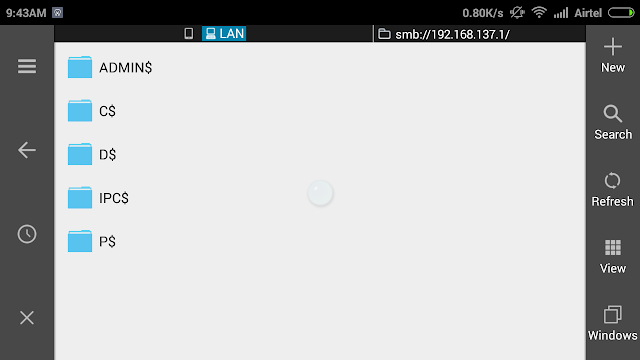
#5 Click on ok, Now you access your Shared Computer Drive and Folder from Android Mobile with the help of Es File Explorer.
Access Computer Drives in Android Mobile
You can use this method for watching PC movies in android mobile. You can also stream your all PC music to android mobile.